<?xml version="1.0" encoding="UTF-8"?>
<feed xmlns="http://www.w3.org/2005/Atom" xml:lang="">
                        <id>https://fantasythemes.support-hub.io/feed/221</id>
                                <link href="https://fantasythemes.support-hub.io/feed/221" rel="self"></link>
                                <title><![CDATA[casaRoyal - Real Estate WordPress Theme Article Feed]]></title>
                    
                                <subtitle></subtitle>
                                                    <updated>2018-12-17T16:38:52+00:00</updated>
                        <entry>
            <title><![CDATA[Installation]]></title>
            <link rel="alternate" href="https://fantasythemes.support-hub.io/articles/installation" />
            <id>https://fantasythemes.support-hub.io/111</id>
            <author>
                <name><![CDATA[Alex Gurghis]]></name>
            </author>
            <summary type="html">
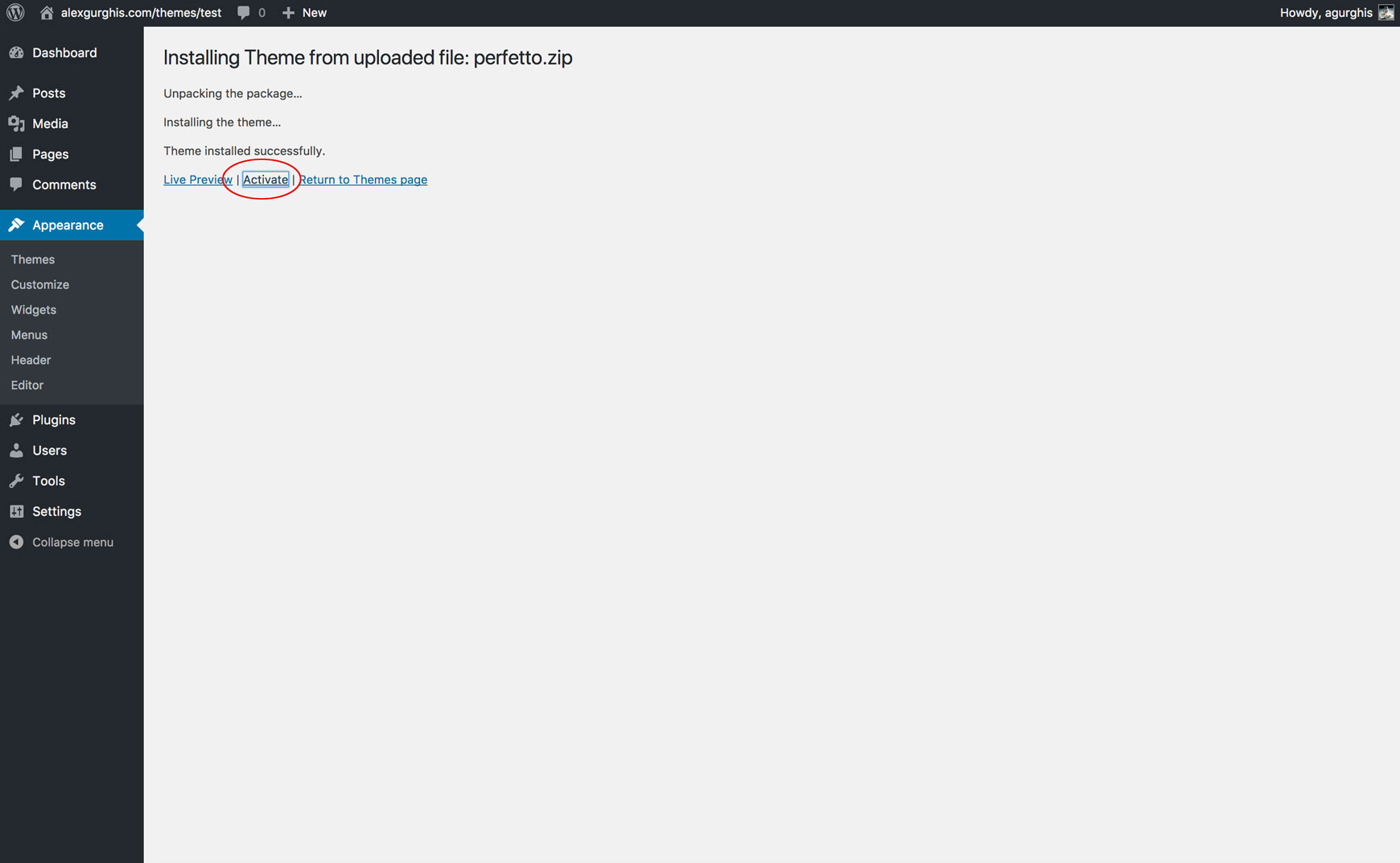
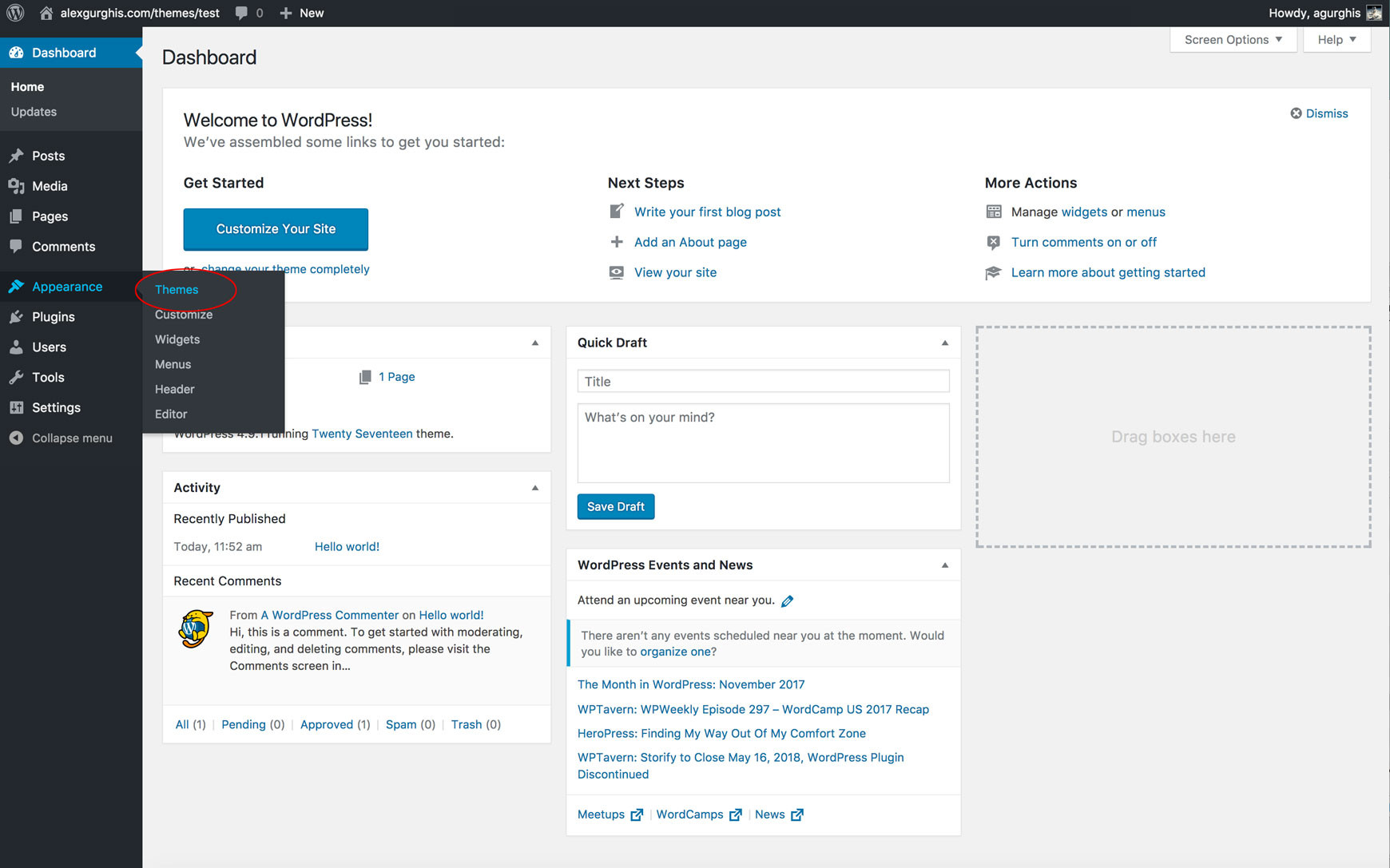
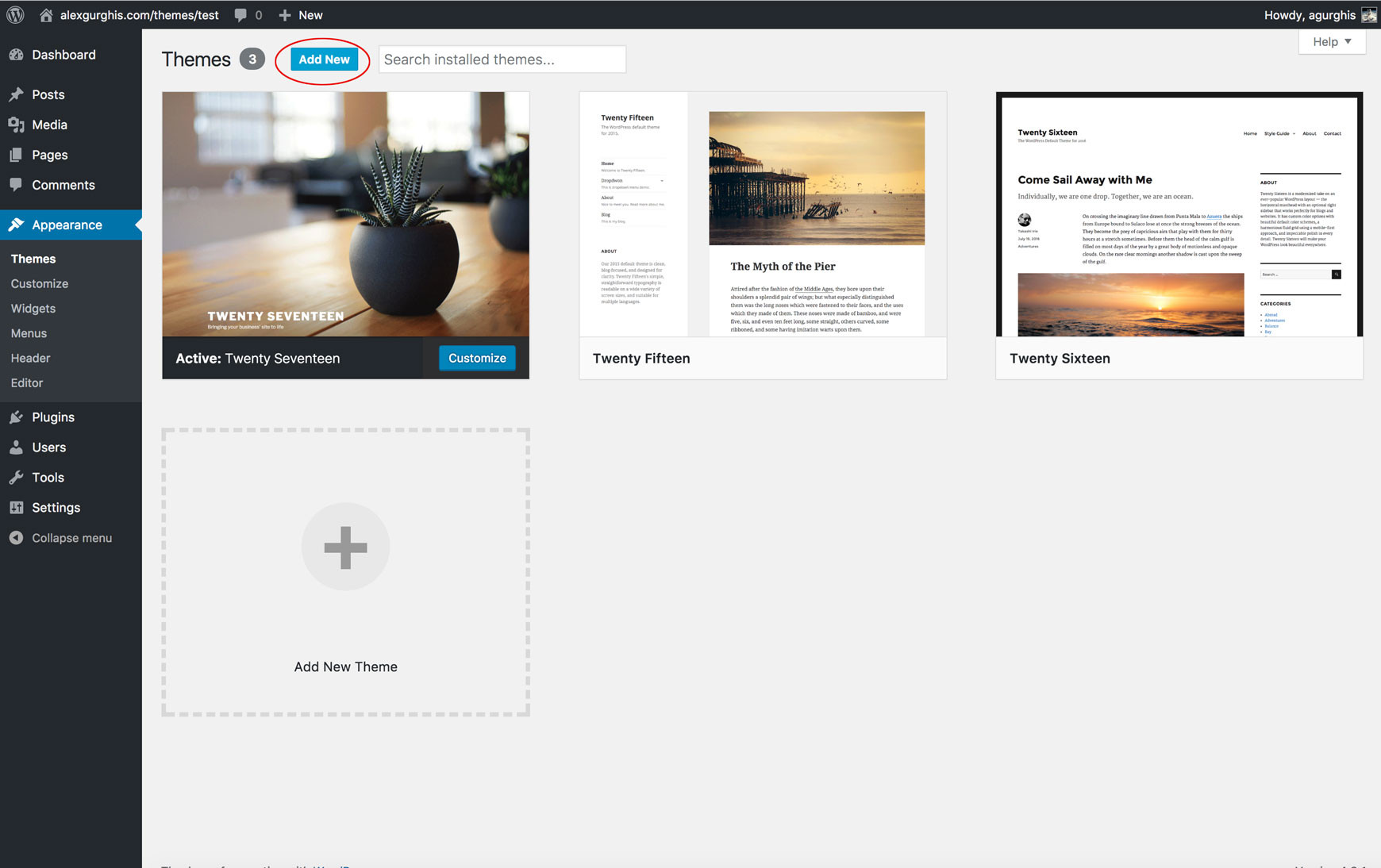
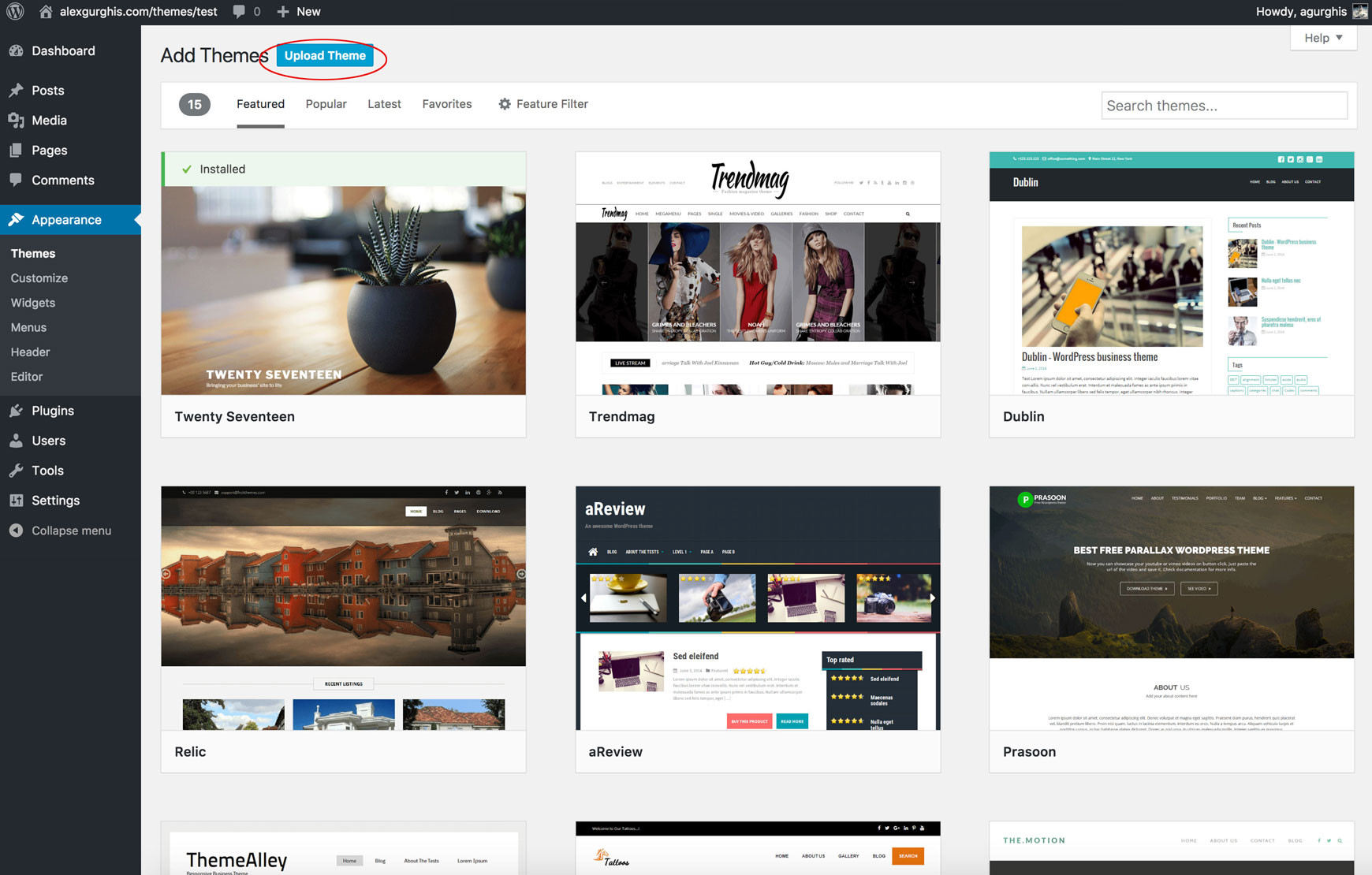
                <![CDATA[<p>Before you attempt to upload your theme you must unzip the downloaded folder. Why? The extra files it contains can cause strange issues to occur in your theme's functionality. Only upload the inner zip folder and only install your theme through the WordPress admin installer located under <b>"Appearance" → "Themes" → "Install".</b></p><p><img src="https://support-hub--assets.s3.eu-west-2.amazonaws.com/assets/103/images/elUru6cFulZxDP7SKSHxgZrHrPi5jVBy5awG1wHO.jpeg" alt="elUru6cFulZxDP7SKSHxgZrHrPi5jVBy5awG1wHO.jpeg" /></p><p><img src="https://support-hub--assets.s3.eu-west-2.amazonaws.com/assets/103/images/VC5rhOyQBZOSZu0GvrmP6whU63A8vjBBalRyS9Zm.jpeg" alt="VC5rhOyQBZOSZu0GvrmP6whU63A8vjBBalRyS9Zm.jpeg" /></p><p><img src="https://support-hub--assets.s3.eu-west-2.amazonaws.com/assets/103/images/2q0tIcgs2ewjzU0eDuVBgBwRcuGrg8S42mo0xMcT.jpeg" alt="2q0tIcgs2ewjzU0eDuVBgBwRcuGrg8S42mo0xMcT.jpeg" /></p><p>After the theme has been nstallet click on "Activate".</p><p><img src="https://support-hub--assets.s3.eu-west-2.amazonaws.com/assets/103/images/U2zjt1cHU0X7Ge2j9irYSZ18Gjza5rDTvlZgI6iS.jpeg" alt="U2zjt1cHU0X7Ge2j9irYSZ18Gjza5rDTvlZgI6iS.jpeg" /><br /><br />If this way to install the theme fails, we recommend to use FTP. Open your FTP client and move to your WordPress installation path. Drag &amp; Drop the "theme" folder into the following path:<br /></p><p><br /></p><pre>wp-content/themes/</pre><p>              <br />Now go to your <b>"Dashboard" → "Appearance" → Theme</b> and activate the theme. <br /></p><p><br />Follow the top banner instructions and&lt;b&gt; install/activate the recommended plugins&lt;/b&gt; available for free from WordPress.org or that are included with the theme.</p><p><br /></p><p><img style="width:759.733px;" src="https://fantasythemes.net/themes/casaroyal/doc/images/required-plugins.jpg" alt="required-plugins.jpg" /><br />Below you can find the essential list of the free plugins:</p><ul><li><a href="https://wordpress.org/plugins/one-click-demo-import/" target="_blank" rel="noreferrer noopener">Category Icon</a><br /></li><li><a href="https://wordpress.org/plugins/contact-form-7" target="_blank" rel="noreferrer noopener">Contact Form 7</a></li><li>casaRoyal Plugin - For casaRoyal main custom post types.<br /></li><li><a href="https://wordpress.org/plugins/snazzy-maps/" target="_blank" rel="noreferrer noopener">Snazzy Maps</a><br /></li><li>WPBakery Visual Composer (Included $34)<br /></li><li><a href="https://wordpress.org/plugins/woocommerce/" target="_blank" rel="noreferrer noopener">WooCommerce</a><br /></li><li><a href="https://wordpress.org/plugins/wordpress-social-login/" target="_blank" rel="noreferrer noopener">WordPress Social Login</a><br /></li></ul><p><br /></p><p><img style="width:759.733px;" src="https://fantasythemes.net/themes/casaroyal/doc/images/required-plugins-2.jpg" alt="required-plugins-2.jpg" /><br /></p>]]>
            </summary>
                                    <updated>2018-10-23T17:49:50+00:00</updated>
        </entry>
            <entry>
            <title><![CDATA[Quick Setup Wizard and Import Demo Content]]></title>
            <link rel="alternate" href="https://fantasythemes.support-hub.io/articles/quick-setup-wizard-amp-import-demo-content" />
            <id>https://fantasythemes.support-hub.io/112</id>
            <author>
                <name><![CDATA[Alex Gurghis]]></name>
            </author>
            <summary type="html">
                <![CDATA[<p>To run quick setup wizard go to <b>Appearance → casaRoyal Quick Setup Wizard</b><img style="width:759.733px;" src="https://fantasythemes.net/themes/casaroyal/doc/images/quick-setup-1.jpg" alt="quick-setup-1.jpg" /></p><p><img style="width:759.733px;" src="https://fantasythemes.net/themes/casaroyal/doc/images/quick-setup-2.jpg" alt="quick-setup-2.jpg" /><img style="width:759.733px;" src="https://fantasythemes.net/themes/casaroyal/doc/images/quick-setup-1.jpg" alt="quick-setup-1.jpg" /></p><p>On second step the wizard will setup the required pages.</p><p><img style="width:759.733px;" src="https://fantasythemes.net/themes/casaroyal/doc/images/quick-setup-3.jpg" alt="quick-setup-3.jpg" /></p><p>The third step regards monetization, in case your website is a <b>real estate marketplace.</b></p><p><img style="width:759.733px;" src="https://fantasythemes.net/themes/casaroyal/doc/images/quick-setup-4.jpg" alt="quick-setup-4.jpg" />On fourth step you will select the number of properties o page and other tweeks.</p><p><img style="width:759.733px;" src="https://fantasythemes.net/themes/casaroyal/doc/images/quick-setup-5.jpg" alt="quick-setup-5.jpg" /></p><p>On fifth step you will can import demo.</p><p><img style="width:759.733px;" src="https://fantasythemes.net/themes/casaroyal/doc/images/quick-setup-6.jpg" alt="quick-setup-6.jpg" /></p><p>Thats it. It shoudln't take longer than 5 minutes. Actually I run a cronometer and it took me from installing the theme to final step on <b>quick setup wizard</b> 4 minutes and 30 seconds :)</p><p><img style="width:759.733px;" src="https://fantasythemes.net/themes/casaroyal/doc/images/quick-setup-7.jpg" alt="quick-setup-7.jpg" /><br /><b><br /></b><br /></p>]]>
            </summary>
                                    <updated>2018-10-23T17:53:37+00:00</updated>
        </entry>
            <entry>
            <title><![CDATA[How to fix import demo error.]]></title>
            <link rel="alternate" href="https://fantasythemes.support-hub.io/articles/how-to-fix-import-demo-error" />
            <id>https://fantasythemes.support-hub.io/188</id>
            <author>
                <name><![CDATA[Alex Gurghis]]></name>
            </author>
            <summary type="html">
                <![CDATA[<p>This happens because of <b>max_execution_time</b>, <b>memory_limit</b> and maybe because of <b>upload_max_size</b> limit. Those are server settings that can be changed. You can ask the host provider to increase the limits or you can change them in php.ini file:<br /><br /></p><pre>memory_limit = 256M</pre><pre>upload_max_size = 64M</pre><pre>post_max_size = 64M</pre><pre>upload_max_filesize = 64M</pre><pre>max_execution_time = 300</pre><pre>max_input_time = 1000</pre><p><br /><br /><br />or in .htaccess file:<br /><br /></p><pre>php_value memory_limit 256</pre><pre>php_value upload_max_filesize 64M</pre><pre>php_value post_max_size 64M</pre><pre>php_value max_execution_time 300</pre><pre>php_value max_input_time 1000</pre><p><br /><br /><br /><br /><br /></p>]]>
            </summary>
                                    <updated>2018-12-17T16:38:52+00:00</updated>
        </entry>
    </feed>